• HELP CENTER

  • Getting Started
  • CRM
  • Deal Pipeline
  • Portfolio Company
  • Investee Company Portal
  • Investors
  • Investor Portal
  • Funds
  • Investee Fund Portal
  • Reports and Analytics
  • Deal Data Room
  • Help Desk
  • Document Management
  • Excel Add-in Integration
  • Email Integration
  • Implementation
  • Custom Settings
  • System Administration

Getting Started

  • Create a Fund
  • Create an Investor
  • Link Investor to a Fund
  • Create a Deal
  • Link Deal to a Fund
  • Create a Portfolio Company
  • Link Portfolio Company to a Deal
  • Enter Drawdown/Distribution
  • Link Fund to a Portfolio
  • Enter the Cashflows
    • Amortization Schedule
    • Actual Cashflow
    • Expected Cashflow
  • Enter the Valuation
  • Capture quarterly Portfolio level performance
  • Capture quarterly Fund level performance
Help Center /

Link Portfolio Company to a Deal

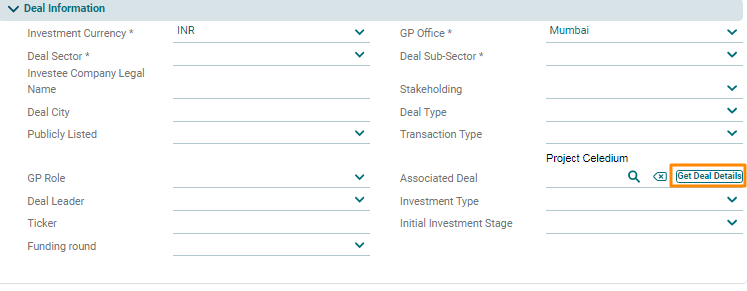
You can link the portfolio company to a deal while creating the Portfolio Company. In Portfolio Information tab, got to Deal Information panel and click on Get Deal Details button to link deal.