Funds Invested
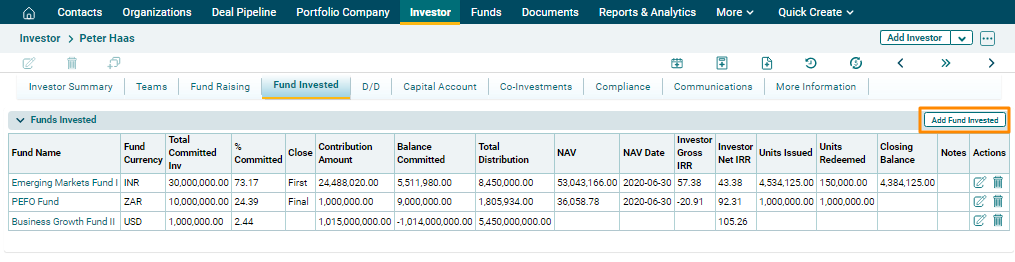
The Funds Invested tab allows you to capture details of the funds in which the investor has invested. The details included are:
- Fund Name: Displays the fund name in which investment has been made.
- Fund Currency: The field will automatically be populated from Funds Module.
- Total Committed Investment: Input the total fund committed by the investor in the fund.
- % Committed: Displays the percentage of investment committed in this fund. This is an auto-calculated field.
- Close: Input the investment stage, whether the investment made is at the initial stage, middle, or final.
- Contribution Amount: Displays the amount of contribution by the investor. This is an auto-calculated field.
- Balance Committed: Displays the balance amount that the investor is yet to commit. This is an auto-calculated field.
- Total Distribution: Displays total distribution that has been made to the investor from the fund. This is an auto-calculated field.
- NAV: Displays the net asset value of the investor. This is an auto-calculated field.
- NAV Date: Displays the date on which NAV was calculated. This is an auto-calculated field.
- Investor Gross IRR: Displays the gross IRR of the investor. This is an auto-calculated field.
- Investor Net IRR: Displays the net IRR of the investor. This is an auto-calculated field.
- Units Issued: Displays the units issued to the investor. This is an auto-calculated field.
- Units Redeemed: Displays units redeemed by the investor. This is an auto-calculated field.
- Closing Balance: Displays the closing balance of the investor. This is an auto-calculated field.
- Notes: Enter notes, if any.
To modify funds invested details, follow the steps below:
1. Click on Add Funds Invested button in the top right corner of the panel.
2. Update the details and click  ) button from Actions column to save.
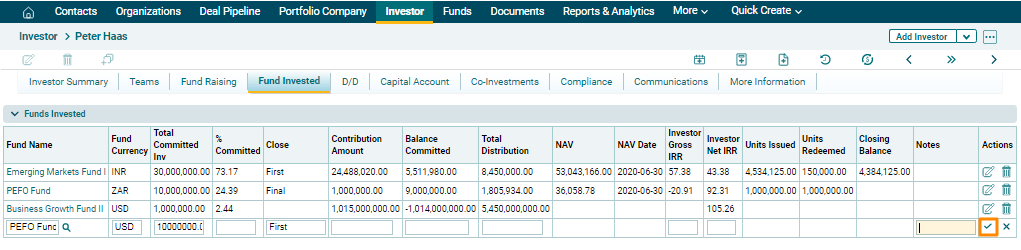
3. To edit fund invested details, click on the Edit icon ( ) in the Actions column. Update the details and click on Check (
 ) button to save.
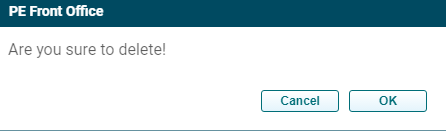
4. To delete fund invested details, click on the Delete icon ( ) in the Actions column. The delete window is displayed. Click OK to delete the fund invested details.